

--------------------
-----------------
本文由http://bentutu.com>Bentutu.com整理编辑,转载注明出处http://bentutu.com/?p=987
-------------------------------------
DVD 抓取工具可以让你复制DVD里面的内容到你的硬盘,也可以将DVD 视频转成各种格式,或备份DVD数据。
下面给大家总结一下Linux下DVD抓取工具,也可以抓取加密的DVD数据,先需安装libdvdcss2(安装方法见附录)。
#1: AcidRIP
AcidRIP是MPlayer/Mencoder的自动前端(抓取和解码工具使用mplayer和mencoder),用Perl语言写成,使用Gtk2::Perl 作为图形界面。
Debian/Ubuntu用户可用下面命令安装:[code]sudo apt-get install acidrip[/code]
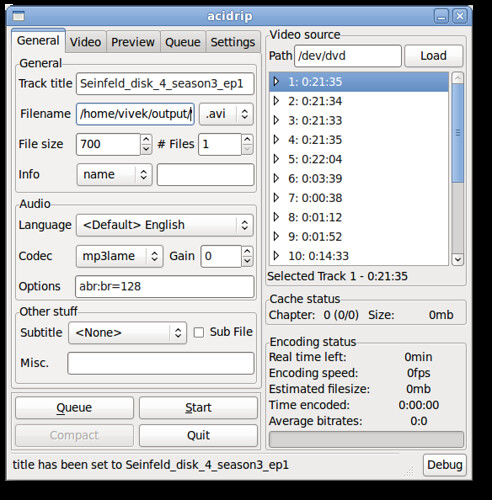
在预览窗口可选择内容:

准备好之后,点击“Start”即刻抓取DVD数据。
=> Download acidrip
#2: DVD::RIP
DVD::RIP是一全能DVD复制程序,PERl语言写成。

Debian/Ubuntu用户可用下面命令安装:[code]sudo apt-get install dvdrip[/code]或=> Download dvd::rip
#3: HandBrake
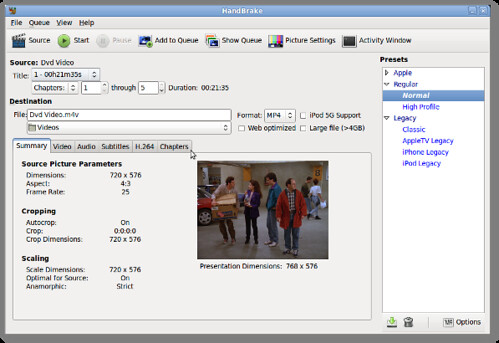
HandBrake是开源的遵循GPL协议,支持多平台视频代码转换。支持MACOSX,Linux和Windows。[code]sudo apt-get install handbrake-gtk[/code]=> Download HandBrake
#4: k9copy
k9copy是KDE下DVD备份工具,可以复制DVD9到DVD5.也可以对DVD进行压缩。功能如下:
[list]
[*]The video stream is compressed to make the video fiton a 4.7GB recordable DVD
[*]DVD Burning
[*]Creation of ISO images
[*]Choosing which audio and subtitle tracks are copied.
[*]Title preview (video only)
[*]The ability to preserve the original menus.
[/list]
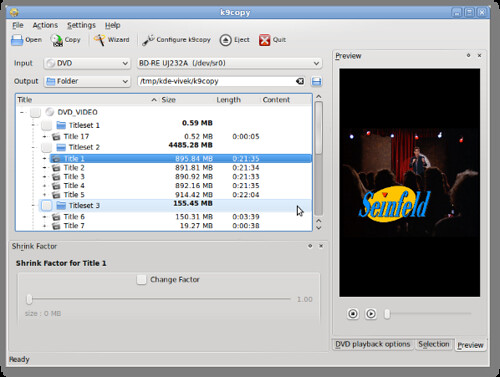
可运用下面命令进行安装:[code] sudo apt-get install k9copy[/code]也可以通过此链接下载=> Download k9copy
----
本文由http://bentutu.com>Bentutu.com整理编辑,转载注明出处http://bentutu.com/?p=987
-----
#5: thoggen
thoggen 是一款Linux下的DVD备份工具,基于GStreamer和GTK+。功能列表:
[list]
[*]Easy to use, with a nice graphical user interface (GUI).
[*]Supports title preview, picture cropping, and picture resizing.
[*]Language Selection for audio track (no subtitle support yet though).
[*]Encodes into Ogg/Theora video.
[*]Can encode from local directory with video DVD files.
[*]Based on the GStreamer multimedia framework, which makes it fairly easy to add additional encoding formats/codecs in future.
[/list]
可通过下面命令安装:[code]sudo apt-get install thoggen[/code]
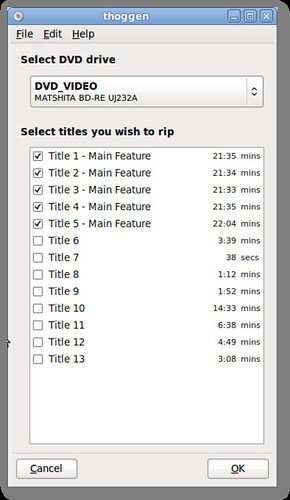
也可通过此链接下载=> Download thoggen。
其他工具和后端
若使用上面所述工具,需安装各种库文件(使用apt命令可以自动安装):
libdvdcss2 - Simple foundation for reading DVDs - runtime libraries.
libdvdnav4 - DVD navigation library.
libdvdread4 - library for reading DVDs.
=> mencoder,使用mencoder抓取DVD数据转换成.avi数据:[code]mencoder dvd://2 -ovc lavc -lavcopts vcodec=mpeg4:vhq:vbitrate="1200" -vf scale -zoom -xy 640 -oac mp3lame -lameopts br=128 -o /nas/videos/my-movies/example/track2.avi[/code]=> VLC,也可以抓取DVD数据;
=> Transcode,命令行下的视频和音频转码工具。
=> Wine,可以运行windows下的程序。可运行DVDFab抓取加密的DVD数据,并对DVD数据进行压缩。
来源『cyberciti.biz』,[b]本文由http://bentutu.com>Bentutu.com整理编辑,转载注明出处 http://bentutu.com/?p=987[/b]
zhe_jiang 于 2013-04-27 11:11:12发表:
mark
metro 于 2013-02-20 17:51:25发表:
学习下
bnmluo 于 2012-12-14 16:59:04发表:
来学习学习
月亮的梦 于 2012-06-03 23:36:49发表:
沙发一定要抢
HYMjpg 于 2011-02-11 16:15:24发表:
还是汉化要命呀~~
Growth兆 于 2011-02-10 09:25:55发表:
感谢tuhaihe的分享,本贴加进论坛顶置的Linux应用贴中
bolsdog 于 2011-02-09 15:06:18发表:
抢个位置,顶~