

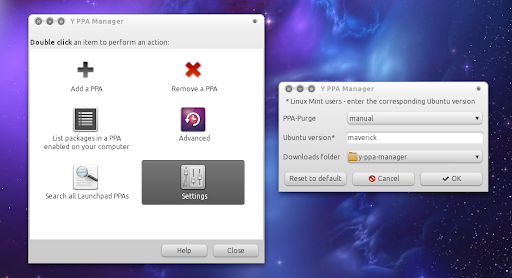
Y PPA Manager可以添加、删除、清理、列表、搜索Launchpad PPA,可在Ubuntu和Linux Mint下工作。
Y PPA Manager 0.0.5今日发布更新,该版本添加了GUI配置:
PPA Purge behavior: auto - don’t require any user input; manual - opens a terminal window asking the user how to solve the issue (this is the default and highly recommended behavior).
Ubuntu version: this only affects the search. So if you want the Y PPA Manager search to display packages for some other Ubuntu version, simply change the Ubuntu version here. Supported versions: karmic, lucid, maverick or natty (use the Ubuntu version names for Linux Mint too!).
Downloads folder: This is the folder where Y PPA Manager downloads the file you select from a PPA (default: ~/Downloads/y-ppa-manager).
安装Y PPA Manager 0.0.5:[code]sudo add-apt-repository ppa:webupd8team/y-ppa-manager
sudo apt-get update
sudo apt-get install y-ppa-manager yad[/code]来源『webupd8.org』,本文由Bentutu.com编辑,转载注明出处http://bentutu.com/?p=642。
更多精彩,欢迎访问Bentutu.com,提供Linux 和Ubuntu软件、新闻、技巧~~~